The IRC protocol explained: the whole thing fits on one page
Updated August 10, 2026
Most chat protocols are an iceberg: a small visible surface and an enormous mass
of framing, serialization, and state underneath. IRC is not that. IRC is a
person standing on top of the water, in full view, holding a sign that says
PRIVMSG #channel :hello.
You can open a raw socket to an IRC server with telnet or openssl s_client,
type a few lines by hand, and be chatting. That's not a party trick — it's the
actual protocol, and the fact that you can do it is the point. This page is
the whole client protocol, start to finish.
Lineage, in one line: the protocol was first written down by Jarkko Oikarinen and Darren Reed as RFC 1459 (May 1993), updated by RFC 2812 (April 2000), and is kept alive today by the living Modern IRC document and the IRCv3 extensions. The RFCs are wrong in places about what real servers do; "Modern" is the better reference now.
The message format
Everything on an IRC connection — in both directions — is a line of UTF-8 text
ending in carriage-return-plus-line-feed (\r\n). Historically a line is capped
at 512 bytes including the \r\n (IRCv3 message tags extend this). One line,
one message. That's the framing. There is no length prefix, no binary header, no
envelope.
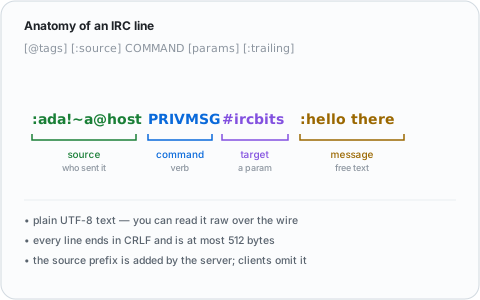
A single message has up to three parts:
[@tags] [:source] COMMAND [param1 param2 ...] [:trailing parameter with spaces]
@tags(optional, IRCv3) — metadata like@time=2026-06-28T10:00:00.000Z. Skip these and you have classic IRC.:source(optional) — who the message is from, asnick!user@host. Servers attach this when relaying to you; you almost never send it yourself.COMMAND— either a word likePRIVMSG/JOIN, or a three-digit numeric like001(servers use numerics for replies).- Parameters — space-separated. The last parameter can contain spaces if
it's prefixed with a colon (
:). That colon is the single most important punctuation mark in IRC: it means "everything after this is one final argument."
So when you type /msg #linux hello there in a client, what goes down the wire
is literally:
PRIVMSG #linux :hello there
And what the other people in the channel receive is the same line with your identity stamped on the front:
:you!youruser@your.host PRIVMSG #linux :hello there
That asymmetry — you send a bare command, the server adds the :source when it
fans the message out — is most of how IRC works. Learn that and the rest is
vocabulary.
What port does IRC use?
Port 6667 is the historical plaintext default; port 6697 is the modern TLS default, and what you should actually connect to — plaintext IRC sends your password and messages unencrypted. Most networks also accept a range around these (6660–6669 plaintext, 6697/9999 TLS are common), but 6697 with TLS is the safe assumption for any server in 2026.
The handshake
When you connect, you register the session. The minimum is two commands (three if the server wants a password):
PASS somepassword          (only if the server requires one — most don't)
NICK YourNick
USER yourname 0 * :Your Real Name
NICK claims a nickname; USER supplies a username and a free-text "real name"
(the 0 * in the middle are a mode bitmask and an unused field — just send them).
If all goes well, the server replies with the welcome burst — numerics
001–004 (RPL_WELCOME and friends), some server info, and then the message
of the day wrapped in 375 / 372 / 376 (RPL_MOTDSTART / RPL_MOTD /
RPL_ENDOFMOTD). Seeing 376 (or 422, "no MOTD") is the universal "you're
in, you can start sending commands now" signal — bots watch for exactly this
before joining channels.
If your nick is taken you get numeric 433 (ERR_NICKNAMEINUSE) and have to
pick another. On modern networks you'd authenticate during this handshake with
SASL so the server knows who you are
before you've even finished connecting.
The commands that actually matter
There are dozens of commands in the RFCs. In practice you use about ten:
JOIN #channel— start listening to a channel. The server confirms by sending you aJOINline, the topic (332RPL_TOPIC), and the member list (353RPL_NAMREPLY, ending in 366RPL_ENDOFNAMES). Channels are created the instant the first person joins a name that doesn't exist — there is no "create channel" command.PART #channel/QUIT :reason— leave a channel / disconnect entirely.PRIVMSG target :text— send a message.targetis a channel (#linux) or a nickname (for a private message). This is the command that does the actual talking.NOTICE target :text— likePRIVMSG, but the convention is that clients and bots must not auto-reply to aNOTICE. It's for messages that shouldn't trigger a response loop.MODE target +flags— change channel modes (+m,+i,+b…) or user modes. Dual-purpose: same command for both.TOPIC #channel :new topic— read or set a channel's topic.KICK #channel nick :reason— remove someone from a channel (needs ops).NICK newnick— change your nickname mid-session.WHO/WHOIS/NAMES/LIST— ask about users, a specific user, who's in a channel, or what channels exist.PING/PONG— keepalive (next section).
That's a working IRC client's entire vocabulary. Everything in a fancy GUI is one of these commands with a nicer button on it.
PING/PONG: the one thing you can't skip
Servers periodically send you a PING to check you're still alive:
PING :somerandomtoken
You must answer it, immediately, by echoing the token back as a PONG:
PONG :somerandomtoken
Miss enough PINGs and the server assumes you've vanished and disconnects you
("ping timeout" — the most common reason you'll see people drop). This is the
one piece of bookkeeping every client and bot has to handle, and it's three
lines of code. (Confusingly, clients can also send PING to the server to
measure lag — same command, other direction.)
Numeric replies
Servers don't reply to commands with prose; they reply with three-digit numerics, each a code with a defined meaning. A few you'll meet constantly:
| Numeric | Name | Meaning |
|---|---|---|
001 |
RPL_WELCOME |
Registration complete, welcome |
005 |
RPL_ISUPPORT |
"Here's what this server supports" (capabilities, limits) |
332 |
RPL_TOPIC |
The channel topic |
353 |
RPL_NAMREPLY |
List of names in a channel |
366 |
RPL_ENDOFNAMES |
End of that list |
372 |
RPL_MOTD |
A line of the message of the day |
376 |
RPL_ENDOFMOTD |
End of MOTD — you're ready |
433 |
ERR_NICKNAMEINUSE |
That nick is taken |
401 |
ERR_NOSUCHNICK |
No such nick/channel |
474/473/475 |
ERR_BANNED… etc. |
Why your JOIN was refused |
Numeric 005 (RPL_ISUPPORT) is the quiet workhorse of modern IRC: it's how
a server advertises its limits and features (max channel name length, which
channel modes exist, whether the network
supports particular extensions) so clients can adapt instead of guessing.
What IRCv3 added — and what it didn't change
The genius of IRCv3 is that it extended IRC without breaking the line-of-text model. Everything above still works exactly as written. The modern additions ride on top:
- Message tags (
@key=value) put structured metadata on a line — the@time=server-time tag, message IDs, typing notifications, reactions — using the optional tag slot the format always had room for. - Capability negotiation (
CAP LS 302…CAP REQ…CAP END) lets a client and server agree on which extensions to use during the handshake, so old clients and new servers (and vice versa) still interoperate. - SASL folds authentication into that handshake instead of messaging a NickServ bot after the fact.
- chathistory lets a client ask the server for messages it missed — the long- awaited fix for IRC's no-history problem, on networks that implement it.
The full picture is in what is IRCv3. The point for this page: none of it replaced the protocol above. It's the same socket, the same lines, the same colon-before-the-last-argument — with optional extras for clients that want them.
See it yourself
The protocol is legible enough that you can watch it raw. Against a TLS port:
openssl s_client -connect irc.libera.chat:6697 -quiet
then type:
NICK testnick123
USER testnick123 0 * :test
…and watch the welcome burst and MOTD scroll past. You're now speaking IRC by
hand. Join something with JOIN #test, say PRIVMSG #test :hello, and you've
exercised the entire core of the protocol with your own fingers.
That's the whole thing. A chat system you can operate with a keyboard and a socket, designed in 1988, still doing its job in 2026 — and simple enough that writing a bot for it is a genuine weekend project rather than a research expedition.