IRC clients: how to choose one
IRC clients
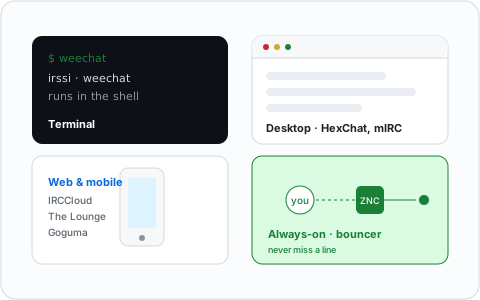
An IRC client is just the program you use to connect. The protocol is open, so there are many of them, and unlike a lot of modern chat apps any client can talk to any network. That means the choice is purely about what fits you: a terminal, a desktop app, a browser tab, or your phone.
In a hurry? The best IRC clients in 2026 is the shortlist, sorted by platform. Otherwise, pick your platform or category below.
By platform
Each guide has screenshots, install links and a comparison table:
- Best IRC clients for Windows — mIRC, AdiIRC, Halloy, KVIrc
- Best IRC clients for macOS — what works after Textual
- Best IRC clients for Linux — the field after HexChat
- Best IRC clients for Android — goguma, IRCCloud, Quasseldroid
- Best IRC clients for iOS — the short but solid list
- Best terminal IRC clients — WeeChat, Irssi and the minimalists
- Best web IRC clients — and what replaced Mibbit
Doing serious work over IRC? IRC clients for professionals covers the always-on setups, with costs stated plainly.
Terminal clients
The traditionalist's choice, and still the most powerful once configured. These run in a shell, which also makes them perfect to leave running on a server.
- WeeChat setup guide — the modern, scriptable favourite
- irssi setup guide — the lean classic that still sets the standard
Desktop clients
A normal windowed app, friendliest if you are coming from Discord or Slack.
- Halloy: a first look — the modern default on every desktop
- Halloy setup guide — config.toml, multiple servers, and bouncer pairing
- mIRC in 2026 — yes, it is still going, and still on Windows
- HexChat setup guide — discontinued upstream; see what to use instead
Web and mobile
Nothing to install, or something that travels in your pocket.
- Use IRC in your browser — connect from any tab
- IRCCloud, explained — a hosted client and bouncer in one
- goguma setup guide — the phone client we recommend without caveats
Always-on: clients plus a bouncer
IRC does not keep history for you — disconnect and you stop receiving messages. The fix is a bouncer: a small always-on program that stays connected on your behalf and replays what you missed. This is the single biggest upgrade to the IRC experience, and the step most newcomers skip.
- What is an IRC bouncer? — the concept, in two minutes
- ZNC setup guide — the long-standing default
- soju setup guide — the modern, multi-network alternative
- The Lounge setup guide — a self-hosted web client that is its own bouncer
Then what?
With a client chosen, the rest is quick:
- How to join an IRC channel — get into your first room
- IRC commands cheat sheet — the reference worth keeping open
- Which network should you be on? — the companion to this page or browse all articles and explore by topic.