The WEBIRC command explained
Updated July 25, 2026
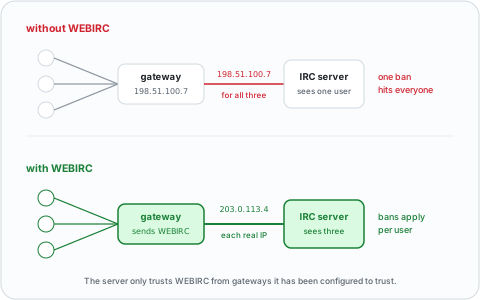
A web gateway connects to IRC on your behalf, so as far as the server is concerned, the gateway is the client. WEBIRC is how the gateway corrects that.
The problem it solves
Every user of a given webchat arrives from the same machine, so they all share one IP address at the server.
That breaks the thing IRC servers rely on most. Ban one abusive user by host and you ban every person using that webchat. K-lines, channel bans and connection throttles all stop distinguishing between people.
Operators used to respond by banning the gateway outright, which is why a lot of networks were hostile to webchat for years.
The syntax
The gateway sends one line, before anything else:
WEBIRC <password> <gateway> <hostname> <ip> [:option1 option2 ...]
| Parameter | Meaning |
|---|---|
password |
Shared secret, agreed with the network in advance |
gateway |
Name identifying the gateway software |
hostname |
The user's resolved hostname, or their IP if it does not resolve |
ip |
The user's real IPv4 or IPv6 address |
The timing is strict: WEBIRC must be the first command the gateway sends,
before capability negotiation and therefore before CAP, NICK and USER.
A server that receives it later is entitled to ignore it.
The optional trailing parameter carries space-separated flags, the useful ones
being secure (the user reached the gateway over TLS) and
remote-port=<port> (the user's source port). Fingerprint options such as
certfp-sha-256=<hash> pass a client certificate through. Servers are expected
to ignore options they do not recognise, so the list can grow.
Specification: ircv3.net/specs/extensions/webirc
What the server does with it
If the sending host is on the trusted list and the password matches, the server
throws away what it knows about the connection and substitutes the hostname and
IP the gateway supplied. Bans, throttles and /whois all work on the real user
from then on.
If either check fails, the server ignores the command. This is the whole security model — nothing stops an arbitrary client from sending WEBIRC, so a server must only honour it from addresses it already trusts.
Configuring it
On UnrealIRCd the trust goes in a
webirc block:
webirc {
    mask 198.51.100.7;
    password "shared-secret";
}
Two things to get right. The mask must be the gateway's address and nothing
broader, because anyone matching it can claim to be any IP on the network.
And your gateway will open a lot of connections from one host, so add an
except ban block for it — otherwise your own flood protection will lock out
webchat users at exactly the moments you have the most of them.
Other server software uses different names for the same two settings; the server software comparison covers what each one calls it. Running your own network is in run your own IRC server.
From the gateway's side
If you are the one running the webchat rather than the network, the work is the same arrangement seen from the other end: the network adds your address and a password, you put that password in your gateway's config. Both KiwiIRC and qwebirc support it.
Setting that up, along with everything else involved, is host your own IRC webchat.
If you are just here to chat
You do not need any of this. The gateway sends WEBIRC for you, and the only
sign you will ever see is that your /whois shows your own host rather than
the webchat's.
Where to open one: web IRC in your browser.