Host your own IRC webchat
Updated July 25, 2026
Your project has a channel and your website has visitors who will never install an IRC client. A webchat closes that gap.
There are four ways to do it, and the first two need no server at all.
Pick an approach
| Approach | You need | Keeps history |
|---|---|---|
| Link to the network's webchat | Nothing | No |
| Embed a hosted KiwiIRC | Nothing | No |
| Self-host KiwiIRC or qwebirc | A server | No |
| Run The Lounge in public mode | A server | Yes |
Just link to the network
The option people skip past. Every large network already runs a webchat, so a plain link costs you nothing and breaks in no way you are responsible for.
<a href="https://web.libera.chat/#yourchannel">Chat with us on IRC</a>
The addresses for every major network are in web IRC in your browser.
This is the right answer more often than not. Take the rest of this page only if you specifically want visitors to stay on your own page.
Embed one without hosting anything
KiwiIRC runs a public instance you are welcome to point at, which gives you an embedded client with no infrastructure of your own.
KiwiIRC's client builder is the shortest path: fill in the network, channel, default nickname and theme, and it generates the HTML to paste into your page. It also emits a Markdown badge if what you actually wanted was a link in a README.
The underlying URLs are worth knowing, because you can construct them yourself:
https://kiwiirc.com/client/irc.libera.chat/#yourchannel
https://kiwiirc.com/nextclient/#irc://irc.libera.chat/#yourchannel
Add ?nick=visitor to preset the nickname. Dropping either URL into an
<iframe> with your own width and height is all the "embedding" amounts to:
<iframe src="https://kiwiirc.com/nextclient/#irc://irc.libera.chat/#yourchannel"
        width="100%" height="600" style="border:0"></iframe>
The trade-off is that your chat is now someone else's uptime, and your visitors connect through kiwiirc.com's servers rather than yours.
Get it: kiwiirc.com/clientbuilder — free, no account.
Self-hosting a gateway
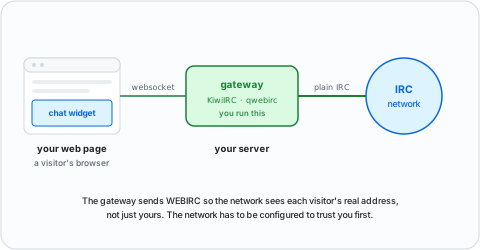
Running it yourself means two pieces: static client files that any web server can serve, and a gateway process that turns browser websockets into ordinary IRC connections. The gateway is the part that has to exist, because most IRC servers do not speak websockets.
KiwiIRC
The featureful one — themes, plugins, an active plugin ecosystem. You run
webircgateway alongside the client files, and configure networks in
static/config.json.
If your own IRC server already supports websockets, you can skip the gateway entirely and let the client connect direct.
Get it:
- kiwiirc.com — free, Debian/Ubuntu and Fedora/CentOS packages, or build from source
- github.com/kiwiirc/kiwiirc — source and wiki
qwebirc
Written by the QuakeNet team for their own network, and still what Rizon and OFTC serve. Older and plainer than KiwiIRC, which is the point: it is small, it is proven at the scale of a large network, and there is not much of it to break.
Get it: qwebirc.org — free, self-host.
The Lounge as a public webchat
The only option here that gives visitors history.
The Lounge is normally a private always-on
client, but setting public: true in ~/.thelounge/config.js turns it into a
drop-in webchat instead — a fresh session per visitor, no accounts.
hackint runs its network webchat this way.
It is heavier than a gateway and it is a Node.js app you now have to keep patched, so take it when you want the polish and not otherwise.
Get it: thelounge.chat — free. Install, reverse proxy and settings in The Lounge setup guide.
Make the network trust your gateway
This is the step that gets skipped, and it only hurts later.
Every visitor using your gateway reaches the network from your server's single IP address. To the network that is one user, so a ban on one troublemaker takes out everyone on your site — and a network that notices an unannounced gateway may simply ban the whole thing.
The fix is the WEBIRC command, which lets your gateway tell the server each visitor's real address. Both KiwiIRC and qwebirc support it. What it needs from you is an arrangement with the network: they add your server's address and a shared password to their config, you put the same password in yours.
Ask on the network's staff channel before you launch, not after. Full detail in the WEBIRC command explained.
Which approach?
- You just want people to find the channel: link to the network's webchat.
- You want them to stay on your page, with no server to run: an embedded KiwiIRC from the client builder.
- You run your own infrastructure: self-hosted KiwiIRC, or qwebirc if you prefer small over featureful.
- You want visitors to see what they missed: The Lounge in public mode.
Running the network as well as the webchat is run your own IRC server.