IRC clients for professionals: setups that never miss a message
Updated July 22, 2026
Plenty of people still do serious work over IRC: open source maintainers, ops teams with IRC-driven alerting, projects that run their support channel there. A professional setup has one defining property: you receive every message, whether or not a device of yours was awake. Every setup below delivers that, plus synced history and reliable notifications. They differ in who operates it and what it costs.
At a glance
| Setup | Monthly cost | Operated by | History & sync | Effort to run |
|---|---|---|---|---|
| IRCCloud | $6 (or $60/year) | Them | Everything, everywhere | None |
| soju + goguma/senpai/gamja | VPS cost, ~$5 | You | Chathistory to every client | Moderate |
| The Lounge | VPS cost, ~$5 | You | In the web UI, every device | Low |
| WeeChat relay | VPS cost, ~$5 | You | Via relay frontends | High |
| ZNC | VPS cost, ~$5 | You | Replay on attach | Moderate |
The self-hosted rows share one bill: a small VPS — $4–6 per month at the usual suspects — or a Raspberry Pi that costs nothing further. One server happily runs any of them, for a whole team.
IRCCloud — buy the whole problem away
The only turn-key option on this page, IRCCloud prices itself accordingly: $6 per month, $60 per year (the free tier disconnects after two hours idle, which for professional use means it does not exist).
What you get is genuinely complete — permanent connection, full searchable history, real push on every platform, a team plan with a hosted private server if you want your company channel off the public networks.
What you accept: your traffic and logs live with a third party. For a lone consultant, usually the right trade. For an ops team with compliance requirements, usually not — read the full trade-offs before deciding.
Get it:
- irccloud.com — browser
- Android app — free
- iOS app — free
soju — the self-hosted standard
The modern bouncer is soju: it stays connected, stores history, and serves it over IRCv3 chathistory to every client you attach.
The professional angle is the ecosystem built around it. Use goguma on your phone, senpai in your terminal, and gamja in a browser tab. All three show the same conversations, the same read state and the same history.
This is the setup that behaves most like a modern messenger while remaining entirely yours. Cost: the VPS, and an afternoon with the setup guide.
The Lounge — one process, every screen
Client and bouncer compressed into one Node.js service: The Lounge pairs the always-on architecture with a first-rate web UI.
Every browser and every phone gets the same always-on session; a team instance supports multiple users out of the box.
The least moving parts of any self-hosted option, which is itself a professional feature.
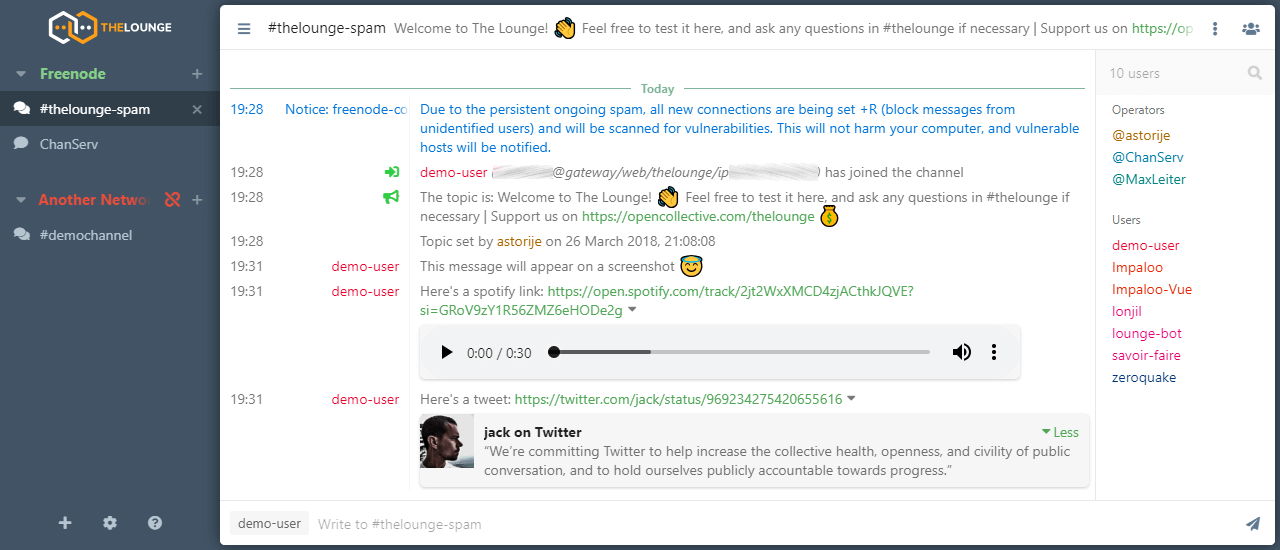
Get it: thelounge.chat — free; setup guide.
WeeChat relay — the power user's version
Run on a server, WeeChat becomes its own always-on hub. The relay protocol lets web and mobile frontends attach to the running instance. The scripting engine will absorb whatever workflow an ops team can describe — alert filtering, log shipping, custom triggers. The most capable option here and the most involved; if the words "my client is scriptable in Python" raise your pulse pleasantly, this is yours. Run 4.9.4 or newer — the July 2026 release fixed two vulnerabilities in exactly these long-running components.
ZNC — the incumbent
For twenty years, ZNC has been the default bouncer, and it still works with every client ever written. That remains its argument. If your team's clients are a museum — some mIRC here, some Irssi there — ZNC serves them all equally.
For a fresh setup, soju's history model is simply better. For an existing fleet, ZNC's compatibility is unbeatable.
Recommendations
- Your time is the expensive part: IRCCloud, $6 per month, done.
- Your data may not leave the building: soju plus goguma/senpai/gamja.
- A small team, one server, no fuss: The Lounge.
- You automate everything anyway: WeeChat with relay.
- Legacy clients you cannot retire: ZNC.
And professional or not, the basics do not change: TLS everywhere, a registered nick per person, and SASL so that every reconnect identifies itself.