Twitch IRC explained: connect any IRC client to Twitch chat
Updated August 9, 2026
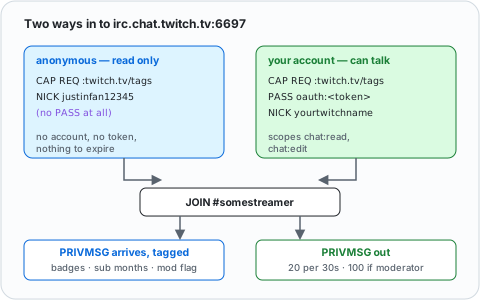
Twitch chat is served over IRC and has been since the start. There is nothing to install and nothing to bridge — put four settings into the client you already use and you are in the channel.
The settings, for any client
| Setting | Value |
|---|---|
| Server | irc.chat.twitch.tv |
| Port | 6697 with TLS/SSL enabled |
| Password | oauth: followed by your token — the prefix is required |
| Nickname | your Twitch login name, lowercase |
| Username / real name | the same lowercase name |
| Channel | # plus the streamer's login name, lowercase |
Twitch has no NickServ and no SASL — authentication is the plain server password
and nothing else. If your client has a "login method" or "authentication" list,
pick server password (PASS), not SASL, not NickServ.
There is a WebSocket endpoint too, wss://irc-ws.chat.twitch.tv:443, which is
what browser-based clients use. Plaintext 6667 still answers but Twitch
documents it as deprecated; use 6697.
Getting your OAuth token
This is the only fiddly part, and the advice in most guides is now wrong. twitchapps.com/tmi — the generator every tutorial links to — has been discontinued. Its author now points people elsewhere.
Two routes remain, and they trade convenience against trust.
The quick way
Twitch Token Generator authorises against your account and hands back a token. It is the successor twitchapps itself recommends, and it takes about a minute.
Understand what you are doing: a third-party site ends up holding a credential that can read and post in chat as you. Its own documentation advises against using it for anything beyond development and testing. Revoke it under Twitch → Settings → Connections when you are done, and never paste a token anywhere else.
The proper way
The official CLI keeps the token between you and Twitch. Register an application
at the Twitch developer console with
http://localhost:3000 as the first OAuth redirect URL — no trailing slash —
then:
twitch configure                        # paste the app's client ID and secret
twitch token -u -s 'chat:read chat:edit'
That opens a browser, you authorise, and the CLI prints the token. chat:read
lets you see the channel; chat:edit lets you talk.
Download: Twitch CLI releases (Windows, macOS,
Linux; also brew install twitchdev/twitch/twitch-cli and scoop install twitch-cli).
Tokens expire. The response tells you when, in
expires_in. When chat suddenly stops working and the server saysLogin authentication failed, the token lapsed — generate another.
WeeChat
One command, then connect:
/server add twitch irc.chat.twitch.tv/6697 -tls \
    -password=oauth:yourtokenhere -nicks=yourtwitchname
/connect twitch
/join #somestreamer
Add the Twitch capabilities to get badges, subscriber status and emote data alongside each message:
/set irc.server.twitch.capabilities "twitch.tv/membership,twitch.tv/tags,twitch.tv/commands"
Store the token with /secure set twitch_token oauth:… and reference it as
${sec.data.twitch_token} rather than leaving it in plain text in your config.
Setup guide: WeeChat setup guide
Irssi
/server add -auto -tls -network Twitch irc.chat.twitch.tv 6697 oauth:yourtokenhere
/connect Twitch
/join #somestreamer
Older guides use -ssl; current irssi wants -tls. To request the Twitch
capabilities, set an autosendcmd on the network that issues /quote CAP REQ :twitch.tv/tags twitch.tv/commands on connect.
Setup guide: Irssi setup guide
Halloy and other graphical clients
Halloy is configured in TOML, and the keys map straight onto the table above:
[servers.twitch]
nickname = "yourtwitchname"
server = "irc.chat.twitch.tv"
port = 6697
use_tls = true
password = "oauth:yourtokenhere"
channels = ["#somestreamer"]
Halloy requests a fixed set of standard IRCv3 capabilities and has no option for vendor ones, so you get chat as plain text without badges or emote metadata. For reading along that is fine; if you want the tags, use WeeChat or write against the socket directly.
Any graphical client with a server-password field works the same way —
Konversation,
AdiIRC,
KVIrc, mIRC. In mIRC, put
oauth:yourtokenhere in the Password field of the server dialog and tick SSL.
Read more: best IRC clients in 2026
Guides that tell you to use HexChat for this still work, but HexChat's last release was February 2024 and it has since been dropped from Debian testing — see HexChat is dead for what to move to.
What you get, and what you don't
Twitch chat over IRC is chat, not the website. Emotes arrive as plain words with
an emotes tag giving positions and IDs; your client will not draw them.
Badges, subscriber tenure and the moderator flag arrive only if you requested
twitch.tv/tags. Bits, raids and sub notifications come through as
USERNOTICE, which most clients will show as nothing at all.
What works exactly as you would expect: joining, reading, talking, and /me.
What no longer works over IRC
Twitch pulled two things out of IRC in February 2023, and no client setting brings them back:
- Moderation commands.
/ban,/timeout,/clear,/slowand the rest are gone. They now live on the Helix API —POST /helix/moderation/bansfor bans and timeouts,DELETE /helix/moderation/chatto delete a message. If you moderate from an IRC client, you cannot any more. - Whispers. Send them through
POST /helix/whispers.
Reading and sending channel messages over IRC is untouched, and still actively
developed — Twitch added the viewermilestone and modiversary notices in June
2026 and a gif message tag in July 2026.
Rate limits
Twitch counts sends per 30 seconds: 20 messages for an ordinary account, 100 if you are a moderator or the broadcaster in that channel. Joins are capped at 20 per 10 seconds. Exceed either and Twitch silently drops messages or closes the connection. Ordinary human chatting never comes close; anything automated needs to watch it.
Writing a bot
Because it is ordinary IRC, a bot is a socket and a loop — no SDK, no webhooks. The general version of this is writing an IRC bot; what follows is the Twitch-specific shape.
Reading with no account at all
Twitch accepts an anonymous login: a nick of ircbitsh2026 followed by some
digits, no password whatsoever, read-only access to any public channel. That
makes a chat logger a fifteen-second project, with no token to leak or expire.
import socket, ssl

CHANNEL = "#somestreamer"

ctx = ssl.create_default_context()
sock = ctx.wrap_socket(
    socket.create_connection(("irc.chat.twitch.tv", 6697)),
    server_hostname="irc.chat.twitch.tv",
)

def send(line):
    sock.sendall((line + "\r\n").encode("utf-8"))

send("CAP REQ :twitch.tv/tags twitch.tv/commands")
send("NICK ircbitsh2026")          # no PASS at all: anonymous, read-only
send(f"JOIN {CHANNEL}")

buf = ""
while True:
    buf += sock.recv(4096).decode("utf-8", "replace")
    while "\r\n" in buf:
        line, buf = buf.split("\r\n", 1)

        if line.startswith("PING"):
            send("PONG :tmi.twitch.tv")
            continue

        tags = {}
        if line.startswith("@"):
            tagstr, line = line[1:].split(" ", 1)
            tags = dict(t.split("=", 1) for t in tagstr.split(";"))

        if " PRIVMSG " in line:
            prefix, _, rest = line.partition(" PRIVMSG ")
            channel, _, text = rest.partition(" :")
            user = tags.get("display-name") or prefix.split("!")[0].lstrip(":")
            badge = "MOD " if tags.get("mod") == "1" else ""
            print(f"{channel} {badge}<{user}> {text}")
Point it at a busy channel and messages start printing immediately:
#somestreamer <ViewerOne> what map is this
#somestreamer <ViewerTwo> chat is 90% bots
#somestreamer MOD <ChannelBot> Thanks for the resub!
A bot that answers
Same loop, with a PASS line and a send guard. Give the bot its own Twitch
account — do not use your own unless you want it talking as you — and generate
the token while logged in as that account. The nick must be that account's login
name in lowercase and must match the token's owner, or Twitch replies
:tmi.twitch.tv NOTICE * :Login authentication failed and hangs up.
import os, socket, ssl, time

NICK    = os.environ["TWITCH_NICK"].lower()      # the bot account's login name
TOKEN   = os.environ["TWITCH_TOKEN"]             # without the "oauth:" prefix
CHANNEL = "#" + os.environ["TWITCH_CHANNEL"].lower()

ctx = ssl.create_default_context()
sock = ctx.wrap_socket(
    socket.create_connection(("irc.chat.twitch.tv", 6697)),
    server_hostname="irc.chat.twitch.tv",
)

def send(line):
    sock.sendall((line + "\r\n").encode("utf-8"))

last_sent = 0.0
def say(text):
    global last_sent
    time.sleep(max(0.0, 1.6 - (time.time() - last_sent)))   # stay under 20/30s
    send(f"PRIVMSG {CHANNEL} :{text}")
    last_sent = time.time()

send("CAP REQ :twitch.tv/tags twitch.tv/commands")
send(f"PASS oauth:{TOKEN}")
send(f"NICK {NICK}")
send(f"JOIN {CHANNEL}")

buf = ""
while True:
    buf += sock.recv(4096).decode("utf-8", "replace")
    while "\r\n" in buf:
        line, buf = buf.split("\r\n", 1)

        if line.startswith("PING"):
            send("PONG :tmi.twitch.tv")
            continue
        if "Login authentication failed" in line:
            raise SystemExit("bad or expired token")
        if line.startswith(("RECONNECT", ":tmi.twitch.tv RECONNECT")):
            raise SystemExit("server asked us to reconnect")

        tags = {}
        if line.startswith("@"):
            tagstr, line = line[1:].split(" ", 1)
            tags = dict(t.split("=", 1) for t in tagstr.split(";"))

        if " PRIVMSG " not in line:
            continue

        prefix, _, rest = line.partition(" PRIVMSG ")
        _, _, text = rest.partition(" :")
        user = tags.get("display-name") or prefix.split("!")[0].lstrip(":")

        if text.strip() == "!ping":
            say(f"@{user} pong")
        elif text.startswith("!so ") and tags.get("mod") == "1":
            say(f"Go follow twitch.tv/{text[4:].strip()}")
RECONNECT is Twitch telling you it is about to restart the server you are on;
a real bot reconnects there rather than exiting.
The tags are where the value is
Every message carries metadata that plain IRC has no way to express (wrapped below; it is one line on the wire):
@badge-info=subscriber/22;badges=subscriber/18,moderator/1;color=#FFFC00;
display-name=SomeViewer;first-msg=0;id=1901b22b-…;mod=1;room-id=71092938;
returning-chatter=0;subscriber=1;tmi-sent-ts=1785036056736;user-id=207256742
 :someviewer!someviewer@someviewer.tmi.twitch.tv PRIVMSG #somestreamer :hello
Subscriber status and tenure, moderator flag, first-time-chatter detection, the user's colour, a stable message id for replies and deletions, and a server timestamp — all before you have written any logic.
Twitch's own migration guide recommends moving to EventSub and the Helix send-message API, which is the right call for anything commercial. But it recommends; it does not deprecate. For a personal bot, IRC remains the fastest path from nothing to working.
Where to go next
- Relaying Twitch chat into a real IRC channel — bridging IRC to other platforms
- The general version, on real networks — writing an IRC bot
- What all these commands actually are — the IRC protocol explained